
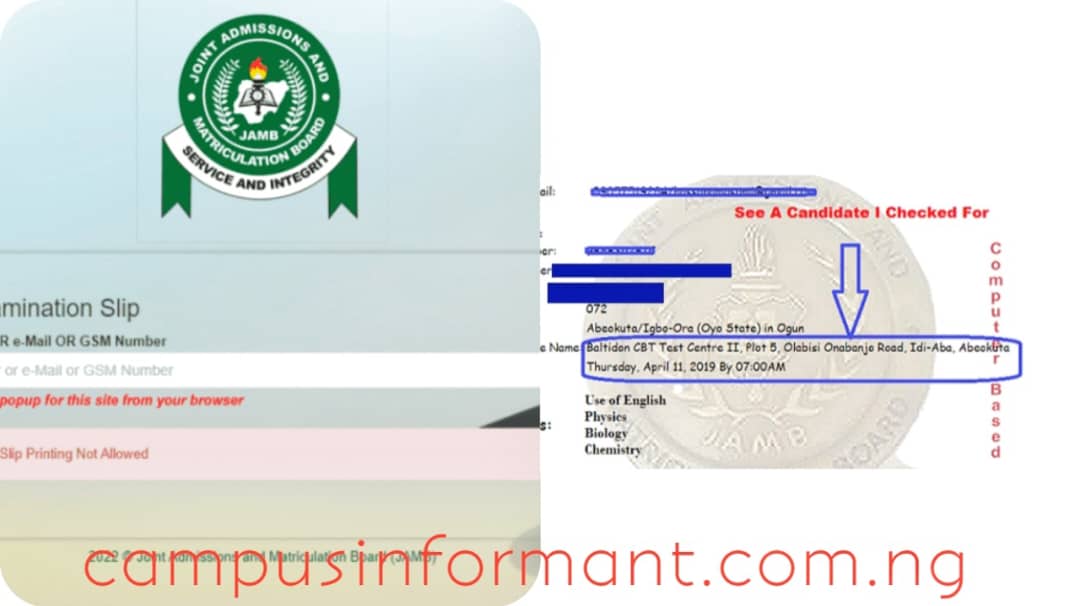
How To Check JAMB Center and Exam Date (JAMB reprinting Slip): Do you want to know how to check your JAMB center and exam date? Are you asking how to print your JAMB examination slip? Has JAMB started reprinting slips? How will you know your UTME exam venue and time?
Many candidates usually ask these questions after completing their JAMB registration.
Hello Achievers. Welcome to our website once again. In this guide, you will learn how to check your 2026 JAMB examination date, center, and time. You will also understand how the JAMB reprinting process works and where you can print your examination slip.
One thing many candidates notice after registration is that JAMB does not immediately show the exam date, time, or center. This often confuses first-time candidates. However, there is nothing to worry about.

The only way to see your UTME exam venue, date, and time is by reprinting your JAMB examination slip.
Once you print the slip, you will see the full details of your examination.
Follow us on our WhatsApp channel by CLICKING HERE and you can comment through the comments section if you have any questions or contributions.
How To Check JAMB Center and Exam Date
Before you proceed, there is something important you should know.
Important Notice:
The portal for checking the 2026 JAMB examination center and exam date may not yet be active at the time this article was published. JAMB usually opens the reprinting portal a few days or a week before the UTME examination begins.
For this reason, candidates should always check the official JAMB portal regularly for updates.
Once the portal is active, follow the steps below.
Step 1: Visit the JAMB Reprint Portal
Go to the official JAMB reprinting portal through the link below:
https://slipsprinting.jamb.gov.ng
It is better to open the portal using a reliable browser such as Google Chrome or Safari so that the page will load correctly.
Step 2: Enter Your Registration Details
When the page opens, you will see a space where you can enter your details.
You can use any of the following:
- Your JAMB Registration Number
- The Email Address used during registration
- The Phone Number used during registration
Enter the correct information carefully before moving to the next step.
Step 3: Click on “Print Examination Slip”
After entering your details, click on the Print Examination Slip button.
Once the page loads, your JAMB examination slip will appear on the screen.
This slip contains important information such as:
- Your examination date
- Your examination time
- Your CBT exam center and venue
You can then print the slip or save it on your device so that you will not forget the details.
Frequently Asked Questions
When Will JAMB Reprinting Start?
In most cases, JAMB begins reprinting about one week before the UTME examination. Candidates should continue checking the JAMB website until the reprinting starts.
What Is the Deadline for Reprinting JAMB Slip?
There is no fixed deadline announced by JAMB for reprinting the examination slip. However, every candidate should print their slip before their scheduled exam date.
For example, if the UTME examination begins on 16 April, candidates should make sure they print their slip before that date.
How Much Does It Cost To Reprint JAMB Slip?
If you print the slip yourself using your phone or computer, you will not pay anything, but remember to visit a cafe or JAMB CBT centre to print out the PDF into physical/paper form so you can take it along with you when you are going for your UTME exam.
However, if you visit a CBT center or cyber café, they may charge a small service fee for printing.
Where Can You Reprint Your JAMB Slip?
You can reprint your JAMB slip from different places, including:
- Your home using your phone or laptop
- A cyber café
- Any accredited JAMB CBT center
Why Did JAMB Reprinting Not Work on My Phone?
One common reason is that the pop-up option on the browser is turned off.
When the pop-up is disabled, the slip page may not open after clicking the print button.
To solve this problem, go to your browser settings and enable pop-ups, then try printing the slip again.
Recommended Articles:
- Competitive Courses in UNN and Their Score Range
- Top 10 Most Repeated Topics in JAMB English 2026/2027
- JAMB 2026 UTME and Direct Entry Registration Form – Complete Step-by-Step Guide
- How to Gain Admission Easily in UNN 2026
Conclusion
Checking your JAMB examination center, date, and time is very simple once the reprinting portal is open.
All you need to do is visit the official JAMB reprinting portal and print your examination slip.
Portal link:
After printing the slip, you will see the exact exam date, time, and CBT center where your UTME examination will take place.
Follow us on our WhatsApp channel by CLICKING HERE and you can comment through the comments section if you have any questions or contributions.
If you found this guide helpful, share it with your friends on Facebook, WhatsApp, or any other social media platform so that other candidates will also know how to check their JAMB examination details.
